Proven Expertise
Our team brings years of experience in the digital payments industry to provide reliable services.
# Ignition: a beautiful error page for PHP apps
[](https://packagist.org/packages/spatie/ignition)
[](https://github.com/spatie/ignition/actions/workflows/run-tests.yml)
[](https://packagist.org/packages/spatie/ignition)
[Ignition](https://flareapp.io/docs/ignition-for-laravel/introduction) is a beautiful and customizable error page for
PHP applications
Here's a minimal example on how to register ignition.
```php
use Spatie\Ignition\Ignition;
include 'vendor/autoload.php';
Ignition::make()->register();
```
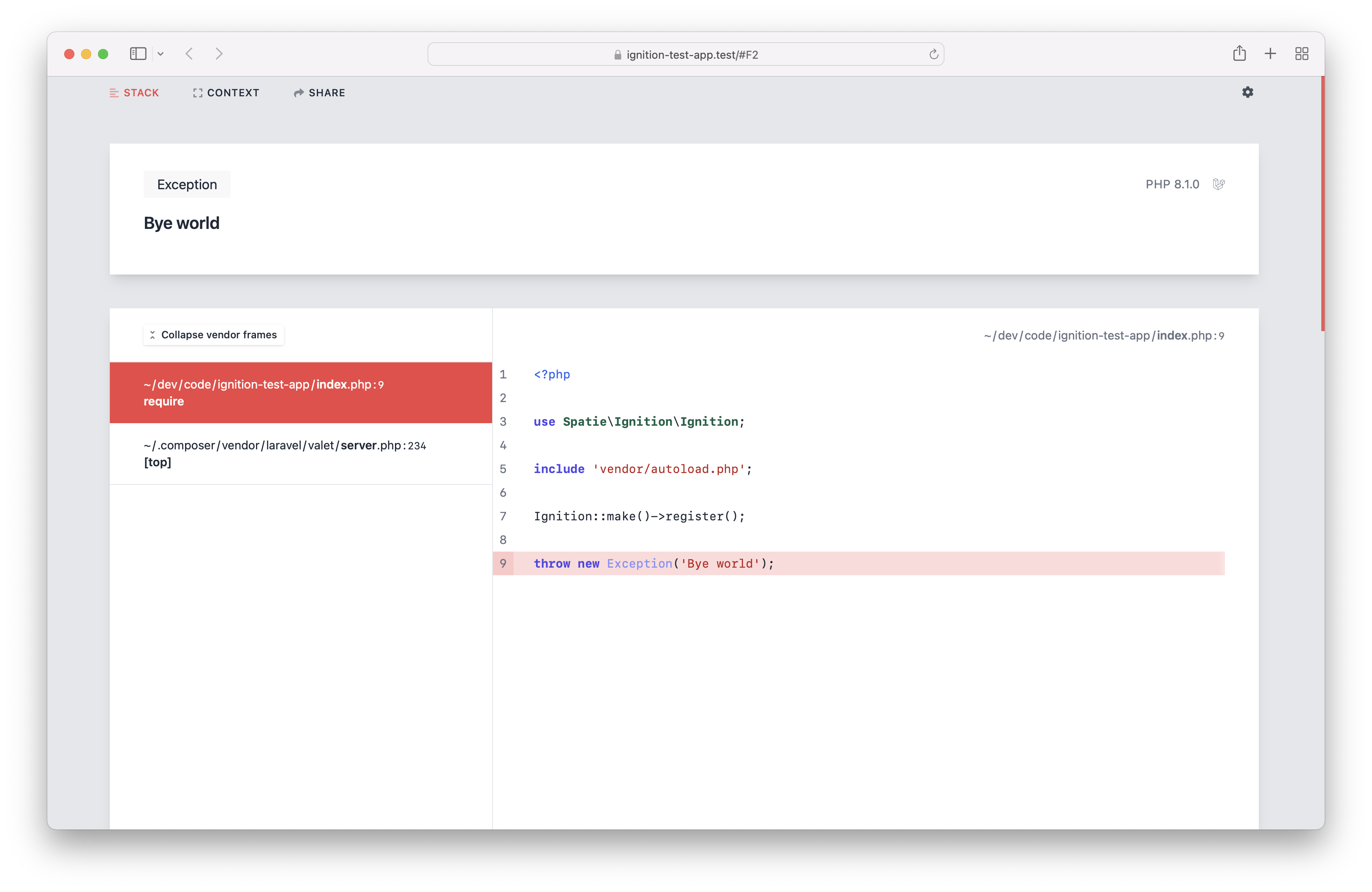
Let's now throw an exception during a web request.
```php
throw new Exception('Bye world');
```
This is what you'll see in the browser.
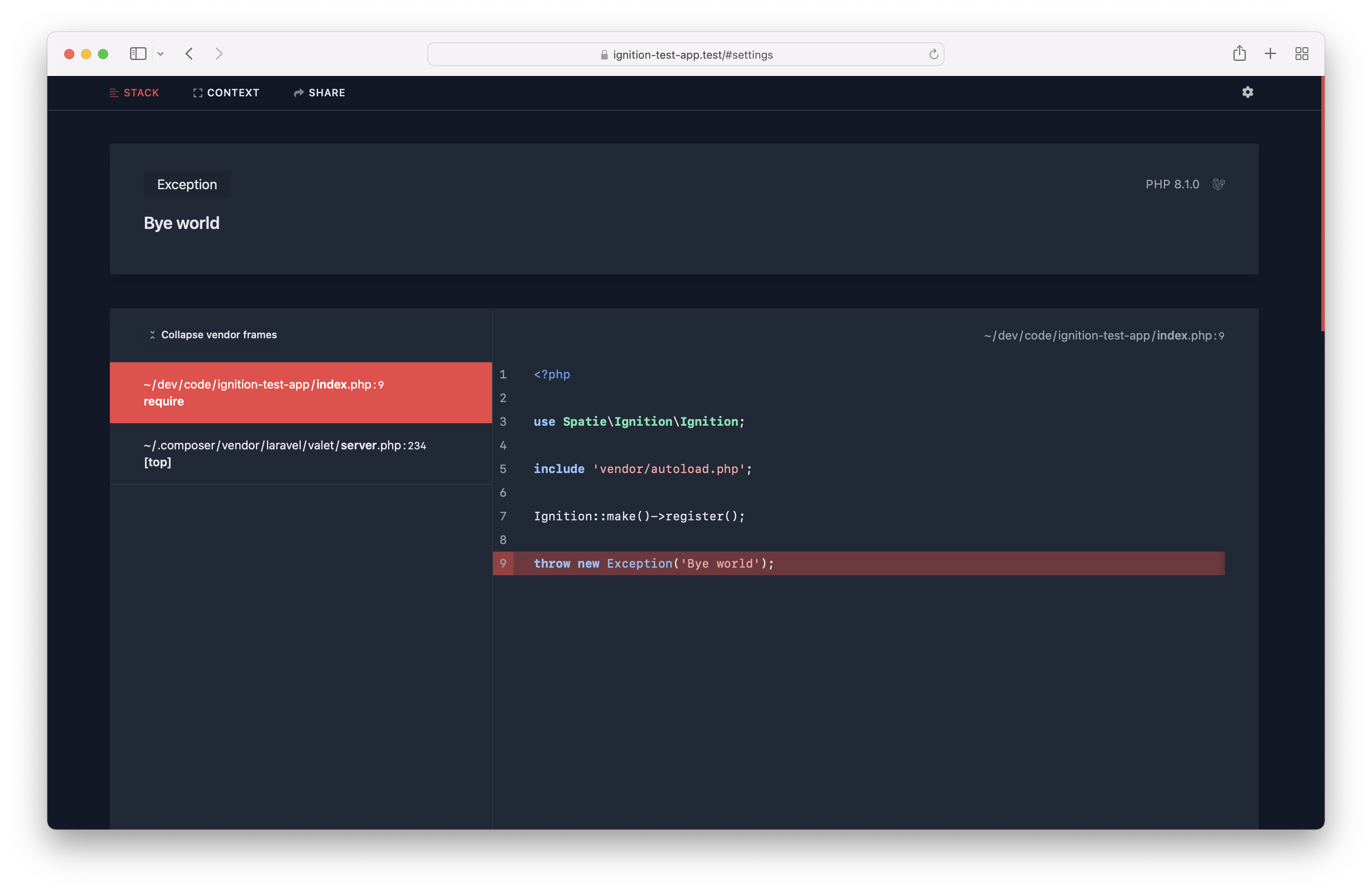
There's also a beautiful dark mode.
## Are you a visual learner?
In [this video on YouTube](https://youtu.be/LEY0N0Bteew?t=739), you'll see a demo of all of the features.
Do know more about the design decisions we made, read [this blog post](https://freek.dev/2168-ignition-the-most-beautiful-error-page-for-laravel-and-php-got-a-major-redesign).
## Support us
[<img src="https://github-ads.s3.eu-central-1.amazonaws.com/ignition.jpg?t=1" width="419px" />](https://spatie.be/github-ad-click/ignition)
We invest a lot of resources into creating [best in class open source packages](https://spatie.be/open-source). You can
support us by [buying one of our paid products](https://spatie.be/open-source/support-us).
We highly appreciate you sending us a postcard from your hometown, mentioning which of our package(s) you are using.
You'll find our address on [our contact page](https://spatie.be/about-us). We publish all received postcards
on [our virtual postcard wall](https://spatie.be/open-source/postcards).
## Installation
For Laravel apps, head over to [laravel-ignition](https://github.com/spatie/laravel-ignition).
For Symfony apps, go to [symfony-ignition-bundle](https://github.com/spatie/symfony-ignition-bundle).
For Drupal 10+ websites, use the [Ignition module](https://www.drupal.org/project/ignition).
For all other PHP projects, install the package via composer:
```bash
composer require spatie/ignition
```
## Usage
In order to display the Ignition error page when an error occurs in your project, you must add this code. Typically, this would be done in the bootstrap part of your application.
```php
\Spatie\Ignition\Ignition::make()->register();
```
### Setting the application path
When setting the application path, Ignition will trim the given value from all paths. This will make the error page look
more cleaner.
```php
\Spatie\Ignition\Ignition::make()
->applicationPath($basePathOfYourApplication)
->register();
```
### Using dark mode
By default, Ignition uses a nice white based theme. If this is too bright for your eyes, you can use dark mode.
```php
\Spatie\Ignition\Ignition::make()
->useDarkMode()
->register();
```
### Avoid rendering Ignition in a production environment
You don't want to render the Ignition error page in a production environment, as it potentially can display sensitive
information.
To avoid rendering Ignition, you can call `shouldDisplayException` and pass it a falsy value.
```php
\Spatie\Ignition\Ignition::make()
->shouldDisplayException($inLocalEnvironment)
->register();
```
### Displaying solutions
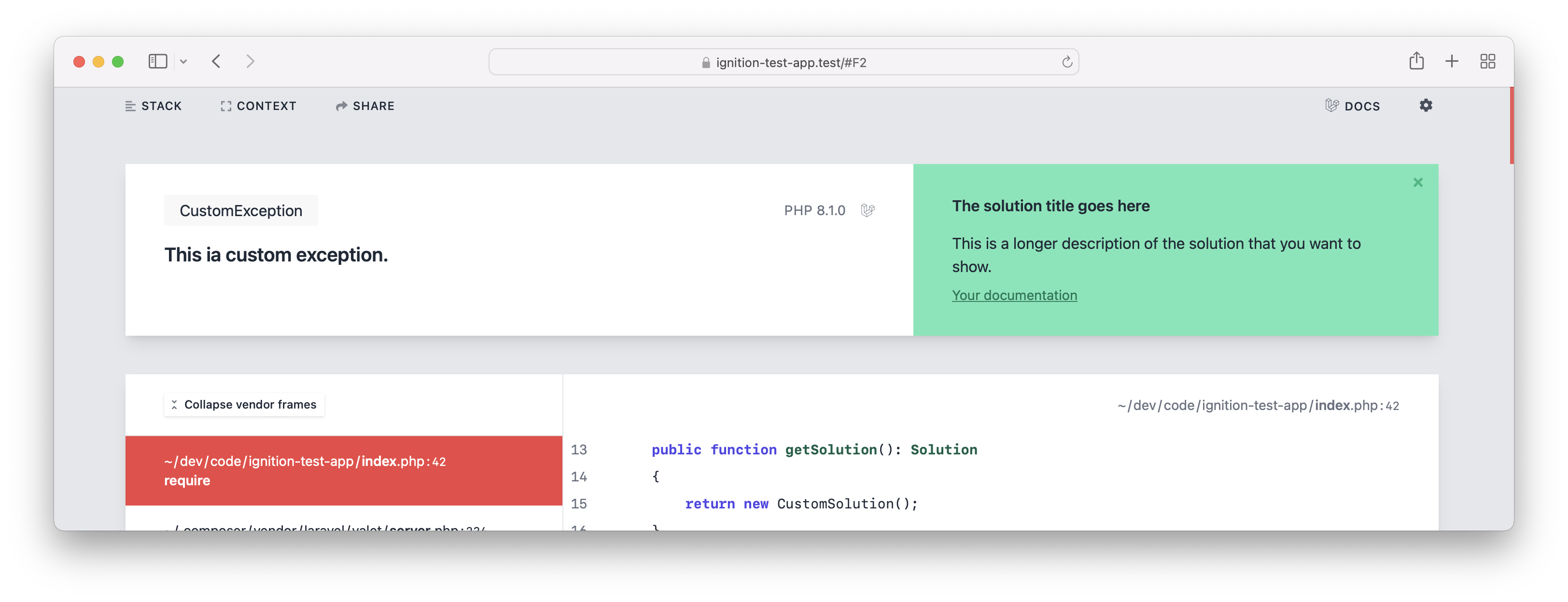
In addition to displaying an exception, Ignition can display a solution as well.
Out of the box, Ignition will display solutions for common errors such as bad methods calls, or using undefined properties.
#### Adding a solution directly to an exception
To add a solution text to your exception, let the exception implement the `Spatie\Ignition\Contracts\ProvidesSolution`
interface.
This interface requires you to implement one method, which is going to return the `Solution` that users will see when
the exception gets thrown.
```php
use Spatie\Ignition\Contracts\Solution;
use Spatie\Ignition\Contracts\ProvidesSolution;
class CustomException extends Exception implements ProvidesSolution
{
public function getSolution(): Solution
{
return new CustomSolution();
}
}
```
```php
use Spatie\Ignition\Contracts\Solution;
class CustomSolution implements Solution
{
public function getSolutionTitle(): string
{
return 'The solution title goes here';
}
public function getSolutionDescription(): string
{
return 'This is a longer description of the solution that you want to show.';
}
public function getDocumentationLinks(): array
{
return [
'Your documentation' => 'https://your-project.com/relevant-docs-page',
];
}
}
```
This is how the exception would be displayed if you were to throw it.
#### Using solution providers
Instead of adding solutions to exceptions directly, you can also create a solution provider. While exceptions that
return a solution, provide the solution directly to Ignition, a solution provider allows you to figure out if an
exception can be solved.
For example, you could create a custom "Stack Overflow solution provider", that will look up if a solution can be found
for a given throwable.
Solution providers can be added by third party packages or within your own application.
A solution provider is any class that implements the \Spatie\Ignition\Contracts\HasSolutionsForThrowable interface.
This is how the interface looks like:
```php
interface HasSolutionsForThrowable
{
public function canSolve(Throwable $throwable): bool;
/** @return \Spatie\Ignition\Contracts\Solution[] */
public function getSolutions(Throwable $throwable): array;
}
```
When an error occurs in your app, the class will receive the `Throwable` in the `canSolve` method. In that method you
can decide if your solution provider is applicable to the `Throwable` passed. If you return `true`, `getSolutions` will
get called.
To register a solution provider to Ignition you must call the `addSolutionProviders` method.
```php
\Spatie\Ignition\Ignition::make()
->addSolutionProviders([
YourSolutionProvider::class,
AnotherSolutionProvider::class,
])
->register();
```
### AI powered solutions
Ignition can send your exception to Open AI that will attempt to automatically suggest a solution. In many cases, the suggested solutions is quite useful, but keep in mind that the solution may not be 100% correct for your context.
To generate AI powered solutions, you must first install this optional dependency.
```bash
composer require openai-php/client
```
To start sending your errors to OpenAI, you must instanciate the `OpenAiSolutionProvider`. The constructor expects a OpenAI API key to be passed, you should generate this key [at OpenAI](https://platform.openai.com).
```php
use \Spatie\Ignition\Solutions\OpenAi\OpenAiSolutionProvider;
$aiSolutionProvider = new OpenAiSolutionProvider($openAiKey);
```
To use the solution provider, you should pass it to `addSolutionProviders` when registering Ignition.
```php
\Spatie\Ignition\Ignition::make()
->addSolutionProviders([
$aiSolutionProvider,
// other solution providers...
])
->register();
```
By default, the solution provider will send these bits of info to Open AI:
- the error message
- the error class
- the stack frame
- other small bits of info of context surrounding your error
It will not send the request payload or any environment variables to avoid sending sensitive data to OpenAI.
#### Caching requests to AI
By default, all errors will be sent to OpenAI. Optionally, you can add caching so similar errors will only get sent to OpenAI once. To cache errors, you can call `useCache` on `$aiSolutionProvider`. You should pass [a simple-cache-implementation](https://packagist.org/providers/psr/simple-cache-implementation). Here's the signature of the `useCache` method.
```php
public function useCache(CacheInterface $cache, int $cacheTtlInSeconds = 60 * 60)
```
#### Hinting the application type
To increase the quality of the suggested solutions, you can send along the application type (Symfony, Drupal, WordPress, ...) to the AI.
To send the application type call `applicationType` on the solution provider.
```php
$aiSolutionProvider->applicationType('WordPress 6.2')
```
### Sending exceptions to Flare
Ignition comes with the ability to send exceptions to [Flare](https://flareapp.io), an exception monitoring service. Flare
can notify you when new exceptions are occurring in your production environment.
To send exceptions to Flare, simply call the `sendToFlareMethod` and pass it the API key you got when creating a project
on Flare.
You probably want to combine this with calling `runningInProductionEnvironment`. That method will, when passed a truthy
value, not display the Ignition error page, but only send the exception to Flare.
```php
\Spatie\Ignition\Ignition::make()
->runningInProductionEnvironment($boolean)
->sendToFlare($yourApiKey)
->register();
```
When you pass a falsy value to `runningInProductionEnvironment`, the Ignition error page will get shown, but no
exceptions will be sent to Flare.
### Sending custom context to Flare
When you send an error to Flare, you can add custom information that will be sent along with every exception that
happens in your application. This can be very useful if you want to provide key-value related information that
furthermore helps you to debug a possible exception.
```php
use Spatie\FlareClient\Flare;
\Spatie\Ignition\Ignition::make()
->runningInProductionEnvironment($boolean)
->sendToFlare($yourApiKey)
->configureFlare(function(Flare $flare) {
$flare->context('Tenant', 'My-Tenant-Identifier');
})
->register();
```
Sometimes you may want to group your context items by a key that you provide to have an easier visual differentiation
when you look at your custom context items.
The Flare client allows you to also provide your own custom context groups like this:
```php
use Spatie\FlareClient\Flare;
\Spatie\Ignition\Ignition::make()
->runningInProductionEnvironment($boolean)
->sendToFlare($yourApiKey)
->configureFlare(function(Flare $flare) {
$flare->group('Custom information', [
'key' => 'value',
'another key' => 'another value',
]);
})
->register();
```
### Anonymize request to Flare
By default, the Ignition collects information about the IP address of your application users. If you don't want to send this information to Flare, call `anonymizeIp()`.
```php
use Spatie\FlareClient\Flare;
\Spatie\Ignition\Ignition::make()
->runningInProductionEnvironment($boolean)
->sendToFlare($yourApiKey)
->configureFlare(function(Flare $flare) {
$flare->anonymizeIp();
})
->register();
```
### Censoring request body fields
When an exception occurs in a web request, the Flare client will pass on any request fields that are present in the body.
In some cases, such as a login page, these request fields may contain a password that you don't want to send to Flare.
To censor out values of certain fields, you can use `censorRequestBodyFields`. You should pass it the names of the fields you wish to censor.
```php
use Spatie\FlareClient\Flare;
\Spatie\Ignition\Ignition::make()
->runningInProductionEnvironment($boolean)
->sendToFlare($yourApiKey)
->configureFlare(function(Flare $flare) {
$flare->censorRequestBodyFields(['password']);
})
->register();
```
This will replace the value of any sent fields named "password" with the value "<CENSORED>".
### Using middleware to modify data sent to Flare
Before Flare receives the data that was collected from your local exception, we give you the ability to call custom middleware methods. These methods retrieve the report that should be sent to Flare and allow you to add custom information to that report.
A valid middleware is any class that implements `FlareMiddleware`.
```php
use Spatie\FlareClient\Report;
use Spatie\FlareClient\FlareMiddleware\FlareMiddleware;
class MyMiddleware implements FlareMiddleware
{
public function handle(Report $report, Closure $next)
{
$report->message("{$report->getMessage()}, now modified");
return $next($report);
}
}
```
```php
use Spatie\FlareClient\Flare;
\Spatie\Ignition\Ignition::make()
->runningInProductionEnvironment($boolean)
->sendToFlare($yourApiKey)
->configureFlare(function(Flare $flare) {
$flare->registerMiddleware([
MyMiddleware::class,
])
})
->register();
```
### Changelog
Please see [CHANGELOG](CHANGELOG.md) for more information about what has changed recently.
## Contributing
Please see [CONTRIBUTING](https://github.com/spatie/.github/blob/main/CONTRIBUTING.md) for details.
## Dev setup
Here are the steps you'll need to perform if you want to work on the UI of Ignition.
- clone (or move) `spatie/ignition`, `spatie/ignition-ui`, `spatie/laravel-ignition`, `spatie/flare-client-php` and `spatie/ignition-test` into the same directory (e.g. `~/code/flare`)
- create a new `package.json` file in `~/code/flare` directory:
```json
{
"private": true,
"workspaces": [
"ignition-ui",
"ignition"
]
}
```
- run `yarn install` in the `~/code/flare` directory
- in the `~/code/flare/ignition-test` directory
- run `composer update`
- run `cp .env.example .env`
- run `php artisan key:generate`
- run `yarn dev` in both the `ignition` and `ignition-ui` project
- http://ignition-test.test/ should now work (= show the new UI). If you use valet, you might want to run `valet park` inside the `~/code/flare` directory.
- http://ignition-test.test/ has a bit of everything
- http://ignition-test.test/sql-error has a solution and SQL exception
## Security Vulnerabilities
Please review [our security policy](../../security/policy) on how to report security vulnerabilities.
## Credits
- [Spatie](https://spatie.be)
- [All Contributors](../../contributors)
## License
The MIT License (MIT). Please see [License File](LICENSE.md) for more information.

How it Works

Getting started with NFC Pay is simple and quick. Register your account, add your cards, and you're ready to make payments in no time. Whether you're paying at a store, sending money to a friend, or managing your merchant transactions, NFC Pay makes it easy and secure.
Download the NFC Pay app and sign up with your email or phone number. Complete the registration process by verifying your identity, and set up your secure PIN to protect your account.
Link your debit or credit cards to your NFC Pay wallet. Simply scan your card or enter the details manually, and you’re set to load funds, shop, and pay with ease.
To pay, simply tap your phone or scan the QR code at checkout. You can also transfer money to other users with a few taps. Enjoy fast, contactless payments with top-notch security.

Security System
NFC Pay prioritizes your security with advanced features that safeguard every transaction. From SMS or email verification to end-to-end encryption, we've implemented robust measures to ensure your data is always protected. Our security systems are designed to prevent unauthorized access and provide you with a safe and reliable payment experience.

Receive instant alerts for every transaction to keep track of your account activities.

Verify your identity through our Know Your Customer process to prevent fraud and enhance security.

Dramatically supply transparent backward deliverables before caward comp internal or "organic" sources.

All your data and transactions are encrypted, ensuring that your sensitive information remains private.

Monitor unusual activity patterns to detect and prevent suspicious behavior in real-time.
Why Choice Us
With NFC Pay, you get a trusted platform backed by proven expertise and a commitment to quality. We put our customers first, offering innovative solutions tailored to your needs, ensuring every transaction is secure, swift, and seamless.
Our team brings years of experience in the digital payments industry to provide reliable services.
We prioritize excellence, ensuring that every aspect of our platform meets the highest standards.
Your needs drive our solutions, and we are dedicated to delivering a superior user experience.
We continuously evolve, integrating the latest technologies to enhance your payment experience.
Testimonial Section
Hear from our users who trust NFC Pay for their everyday transactions. Our commitment to security, ease of use, and exceptional service shines through in their experiences. See why our clients choose NFC Pay for their payment needs and how it has transformed the way they manage their finances.
"NFC Pay has made my transactions incredibly simple and secure. The intuitive interface and quick payment options are game-changers for my business"
"I love how NFC Pay prioritizes security without compromising on convenience. The two-factor authentication and instant alerts give me peace of mind every time I use it."
"Setting up my merchant account was a breeze, and now I can accept payments effortlessly. NFC Pay has truly streamlined my operations, saving me time and hassle."
App Section
Unlock the full potential of NFC Pay by downloading our app, designed to bring secure, swift, and smart transactions to your fingertips. Whether you're paying at a store, transferring money to friends, or managing your business payments, the NFC Pay app makes it effortless. Available on both iOS and Android, it's your all-in-one solution for convenient and reliable digital payments. Download now and experience the future of payments!